#1
by boylee1928 » Thu Oct 24, 2019 3:42 pm
ผมต้องการที่จะกรองข้อมูลจากTextbox หลายๆTextbox เเล้วเเสดงใน Listbox พอจะมีเเนวทางการเขียนโค๊ดไหมครับ
ตัวอย่างโค๊ดที่ผมเขียนสามารถกรองได้เเค่Textboxเดียวเท่านั้น
Code: Select all
Private Sub TextBox1_Change()
Dim i As Long
ListBox1.Clear
Me.ListBox1.AddItem
   For X = 1 To 7
     Me.ListBox1.List(0, X - 1) = Sheet1.Cells(1, X)
   Next X
For i = 2 To Application.WorksheetFunction.CountA(Sheet1.Range("A:A"))
a = Len(Me.TextBox1.Text)
If StrConv(Left(Sheet1.Cells(i, 1).Value, a), vbLowerCase) = StrConv(Left(Me.TextBox1.Text, a), vbLowerCase) Then
Me.ListBox1.AddItem Sheet1.Cells(i, 1).Value
Me.ListBox1.List(ListBox1.ListCount - 1, 1) = Sheet1.Cells(i, 2).Value
Me.ListBox1.List(ListBox1.ListCount - 1, 2) = Sheet1.Cells(i, 3).Value
Me.ListBox1.List(ListBox1.ListCount - 1, 3) = Sheet1.Cells(i, 4).Value
Me.ListBox1.List(ListBox1.ListCount - 1, 4) = Sheet1.Cells(i, 5).Value
Me.ListBox1.List(ListBox1.ListCount - 1, 5) = Sheet1.Cells(i, 6).Value
Me.ListBox1.List(ListBox1.ListCount - 1, 6) = Sheet1.Cells(i, 7).Value
End If
Next i
End Sub

Private Sub TextBox2_Change()
Dim i As Long
ListBox1.Clear
Me.ListBox1.AddItem
   For X = 1 To 7
     Me.ListBox1.List(0, X - 1) = Sheet1.Cells(1, X)
   Next X
For i = 2 To Application.WorksheetFunction.CountA(Sheet1.Range("A:A"))
a = Len(Me.TextBox2.Text)
If StrConv(Left(Sheet1.Cells(i, 2).Value, a), vbLowerCase) = StrConv(Left(Me.TextBox2.Text, a), vbLowerCase) Then
Me.ListBox1.AddItem Sheet1.Cells(i, 1).Value
Me.ListBox1.List(ListBox1.ListCount - 1, 1) = Sheet1.Cells(i, 2).Value
Me.ListBox1.List(ListBox1.ListCount - 1, 2) = Sheet1.Cells(i, 3).Value
Me.ListBox1.List(ListBox1.ListCount - 1, 3) = Sheet1.Cells(i, 4).Value
Me.ListBox1.List(ListBox1.ListCount - 1, 4) = Sheet1.Cells(i, 5).Value
Me.ListBox1.List(ListBox1.ListCount - 1, 5) = Sheet1.Cells(i, 6).Value
Me.ListBox1.List(ListBox1.ListCount - 1, 6) = Sheet1.Cells(i, 7).Value
End If
Next i

End Sub

Private Sub TextBox3_Change()
Dim i As Long
ListBox1.Clear
Me.ListBox1.AddItem
   For X = 1 To 7
     Me.ListBox1.List(0, X - 1) = Sheet1.Cells(1, X)
   Next X
For i = 2 To Application.WorksheetFunction.CountA(Sheet1.Range("A:A"))
a = Len(Me.TextBox3.Text)
If StrConv(Left(Sheet1.Cells(i, 3).Value, a), vbLowerCase) = StrConv(Left(Me.TextBox3.Text, a), vbLowerCase) Then
Me.ListBox1.AddItem Sheet1.Cells(i, 1).Value
Me.ListBox1.List(ListBox1.ListCount - 1, 1) = Sheet1.Cells(i, 2).Value
Me.ListBox1.List(ListBox1.ListCount - 1, 2) = Sheet1.Cells(i, 3).Value
Me.ListBox1.List(ListBox1.ListCount - 1, 3) = Sheet1.Cells(i, 4).Value
Me.ListBox1.List(ListBox1.ListCount - 1, 4) = Sheet1.Cells(i, 5).Value
Me.ListBox1.List(ListBox1.ListCount - 1, 5) = Sheet1.Cells(i, 6).Value
Me.ListBox1.List(ListBox1.ListCount - 1, 6) = Sheet1.Cells(i, 7).Value
End If
Next i
End Sub

Private Sub TextBox4_Change()
Dim i As Long
ListBox1.Clear
Me.ListBox1.AddItem
   For X = 1 To 7
     Me.ListBox1.List(0, X - 1) = Sheet1.Cells(1, X)
   Next X
For i = 2 To Application.WorksheetFunction.CountA(Sheet1.Range("A:A"))
a = Len(Me.TextBox4.Text)
If StrConv(Left(Sheet1.Cells(i, 4).Value, a), vbLowerCase) = StrConv(Left(Me.TextBox4.Text, a), vbLowerCase) Then
Me.ListBox1.AddItem Sheet1.Cells(i, 1).Value
Me.ListBox1.List(ListBox1.ListCount - 1, 1) = Sheet1.Cells(i, 2).Value
Me.ListBox1.List(ListBox1.ListCount - 1, 2) = Sheet1.Cells(i, 3).Value
Me.ListBox1.List(ListBox1.ListCount - 1, 3) = Sheet1.Cells(i, 4).Value
Me.ListBox1.List(ListBox1.ListCount - 1, 4) = Sheet1.Cells(i, 5).Value
Me.ListBox1.List(ListBox1.ListCount - 1, 5) = Sheet1.Cells(i, 6).Value
Me.ListBox1.List(ListBox1.ListCount - 1, 6) = Sheet1.Cells(i, 7).Value
End If
Next i
End Sub

Private Sub TextBox5_Change()
Dim i As Long
ListBox1.Clear
Me.ListBox1.AddItem
   For X = 1 To 7
     Me.ListBox1.List(0, X - 1) = Sheet1.Cells(1, X)
   Next X
For i = 2 To Application.WorksheetFunction.CountA(Sheet1.Range("A:A"))
a = Len(Me.TextBox5.Text)
If StrConv(Left(Sheet1.Cells(i, 5).Value, a), vbLowerCase) = StrConv(Left(Me.TextBox5.Text, a), vbLowerCase) Then
Me.ListBox1.AddItem Sheet1.Cells(i, 1).Value
Me.ListBox1.List(ListBox1.ListCount - 1, 1) = Sheet1.Cells(i, 2).Value
Me.ListBox1.List(ListBox1.ListCount - 1, 2) = Sheet1.Cells(i, 3).Value
Me.ListBox1.List(ListBox1.ListCount - 1, 3) = Sheet1.Cells(i, 4).Value
Me.ListBox1.List(ListBox1.ListCount - 1, 4) = Sheet1.Cells(i, 5).Value
Me.ListBox1.List(ListBox1.ListCount - 1, 5) = Sheet1.Cells(i, 6).Value
Me.ListBox1.List(ListBox1.ListCount - 1, 6) = Sheet1.Cells(i, 7).Value
End If
Next i
End Sub

Private Sub TextBox6_Change()
Dim i As Long
ListBox1.Clear
Me.ListBox1.AddItem
   For X = 1 To 7
     Me.ListBox1.List(0, X - 1) = Sheet1.Cells(1, X)
   Next X
For i = 2 To Application.WorksheetFunction.CountA(Sheet1.Range("A:A"))
a = Len(Me.TextBox6.Text)
If StrConv(Left(Sheet1.Cells(i, 6).Value, a), vbLowerCase) = StrConv(Left(Me.TextBox6.Text, a), vbLowerCase) Then
Me.ListBox1.AddItem Sheet1.Cells(i, 1).Value
Me.ListBox1.List(ListBox1.ListCount - 1, 1) = Sheet1.Cells(i, 2).Value
Me.ListBox1.List(ListBox1.ListCount - 1, 2) = Sheet1.Cells(i, 3).Value
Me.ListBox1.List(ListBox1.ListCount - 1, 3) = Sheet1.Cells(i, 4).Value
Me.ListBox1.List(ListBox1.ListCount - 1, 4) = Sheet1.Cells(i, 5).Value
Me.ListBox1.List(ListBox1.ListCount - 1, 5) = Sheet1.Cells(i, 6).Value
Me.ListBox1.List(ListBox1.ListCount - 1, 6) = Sheet1.Cells(i, 7).Value
End If
Next i
End Sub

Private Sub TextBox7_Change()
Dim i As Long
ListBox1.Clear
Me.ListBox1.AddItem
   For X = 1 To 7
     Me.ListBox1.List(0, X - 1) = Sheet1.Cells(1, X)
   Next X
For i = 2 To Application.WorksheetFunction.CountA(Sheet1.Range("A:A"))
a = Len(Me.TextBox7.Text)
If StrConv(Left(Sheet1.Cells(i, 7).Value, a), vbLowerCase) = StrConv(Left(Me.TextBox7.Text, a), vbLowerCase) Then
Me.ListBox1.AddItem Sheet1.Cells(i, 1).Value
Me.ListBox1.List(ListBox1.ListCount - 1, 1) = Sheet1.Cells(i, 2).Value
Me.ListBox1.List(ListBox1.ListCount - 1, 2) = Sheet1.Cells(i, 3).Value
Me.ListBox1.List(ListBox1.ListCount - 1, 3) = Sheet1.Cells(i, 4).Value
Me.ListBox1.List(ListBox1.ListCount - 1, 4) = Sheet1.Cells(i, 5).Value
Me.ListBox1.List(ListBox1.ListCount - 1, 5) = Sheet1.Cells(i, 6).Value
Me.ListBox1.List(ListBox1.ListCount - 1, 6) = Sheet1.Cells(i, 7).Value
End If
Next i

End Sub
ไฟล์ตัวอย่างครับ
ตัวอย่างรูปภาพครับ
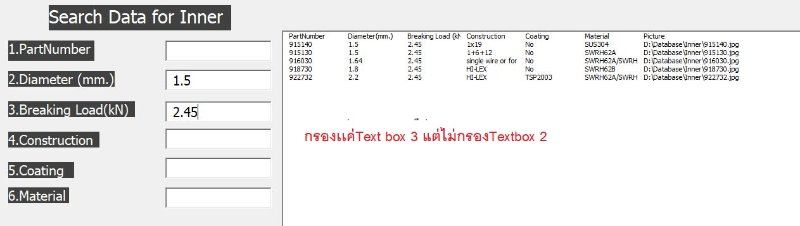
- 1.JPG (31.41 KiB) Viewed 1194 times
ผมต้องการที่จะกรองข้อมูลจากTextbox หลายๆTextbox เเล้วเเสดงใน Listbox พอจะมีเเนวทางการเขียนโค๊ดไหมครับ
ตัวอย่างโค๊ดที่ผมเขียนสามารถกรองได้เเค่Textboxเดียวเท่านั้น
[code]
Private Sub TextBox1_Change()
Dim i As Long
ListBox1.Clear
Me.ListBox1.AddItem
For X = 1 To 7
Me.ListBox1.List(0, X - 1) = Sheet1.Cells(1, X)
Next X
For i = 2 To Application.WorksheetFunction.CountA(Sheet1.Range("A:A"))
a = Len(Me.TextBox1.Text)
If StrConv(Left(Sheet1.Cells(i, 1).Value, a), vbLowerCase) = StrConv(Left(Me.TextBox1.Text, a), vbLowerCase) Then
Me.ListBox1.AddItem Sheet1.Cells(i, 1).Value
Me.ListBox1.List(ListBox1.ListCount - 1, 1) = Sheet1.Cells(i, 2).Value
Me.ListBox1.List(ListBox1.ListCount - 1, 2) = Sheet1.Cells(i, 3).Value
Me.ListBox1.List(ListBox1.ListCount - 1, 3) = Sheet1.Cells(i, 4).Value
Me.ListBox1.List(ListBox1.ListCount - 1, 4) = Sheet1.Cells(i, 5).Value
Me.ListBox1.List(ListBox1.ListCount - 1, 5) = Sheet1.Cells(i, 6).Value
Me.ListBox1.List(ListBox1.ListCount - 1, 6) = Sheet1.Cells(i, 7).Value
End If
Next i
End Sub
Private Sub TextBox2_Change()
Dim i As Long
ListBox1.Clear
Me.ListBox1.AddItem
For X = 1 To 7
Me.ListBox1.List(0, X - 1) = Sheet1.Cells(1, X)
Next X
For i = 2 To Application.WorksheetFunction.CountA(Sheet1.Range("A:A"))
a = Len(Me.TextBox2.Text)
If StrConv(Left(Sheet1.Cells(i, 2).Value, a), vbLowerCase) = StrConv(Left(Me.TextBox2.Text, a), vbLowerCase) Then
Me.ListBox1.AddItem Sheet1.Cells(i, 1).Value
Me.ListBox1.List(ListBox1.ListCount - 1, 1) = Sheet1.Cells(i, 2).Value
Me.ListBox1.List(ListBox1.ListCount - 1, 2) = Sheet1.Cells(i, 3).Value
Me.ListBox1.List(ListBox1.ListCount - 1, 3) = Sheet1.Cells(i, 4).Value
Me.ListBox1.List(ListBox1.ListCount - 1, 4) = Sheet1.Cells(i, 5).Value
Me.ListBox1.List(ListBox1.ListCount - 1, 5) = Sheet1.Cells(i, 6).Value
Me.ListBox1.List(ListBox1.ListCount - 1, 6) = Sheet1.Cells(i, 7).Value
End If
Next i
End Sub
Private Sub TextBox3_Change()
Dim i As Long
ListBox1.Clear
Me.ListBox1.AddItem
For X = 1 To 7
Me.ListBox1.List(0, X - 1) = Sheet1.Cells(1, X)
Next X
For i = 2 To Application.WorksheetFunction.CountA(Sheet1.Range("A:A"))
a = Len(Me.TextBox3.Text)
If StrConv(Left(Sheet1.Cells(i, 3).Value, a), vbLowerCase) = StrConv(Left(Me.TextBox3.Text, a), vbLowerCase) Then
Me.ListBox1.AddItem Sheet1.Cells(i, 1).Value
Me.ListBox1.List(ListBox1.ListCount - 1, 1) = Sheet1.Cells(i, 2).Value
Me.ListBox1.List(ListBox1.ListCount - 1, 2) = Sheet1.Cells(i, 3).Value
Me.ListBox1.List(ListBox1.ListCount - 1, 3) = Sheet1.Cells(i, 4).Value
Me.ListBox1.List(ListBox1.ListCount - 1, 4) = Sheet1.Cells(i, 5).Value
Me.ListBox1.List(ListBox1.ListCount - 1, 5) = Sheet1.Cells(i, 6).Value
Me.ListBox1.List(ListBox1.ListCount - 1, 6) = Sheet1.Cells(i, 7).Value
End If
Next i
End Sub
Private Sub TextBox4_Change()
Dim i As Long
ListBox1.Clear
Me.ListBox1.AddItem
For X = 1 To 7
Me.ListBox1.List(0, X - 1) = Sheet1.Cells(1, X)
Next X
For i = 2 To Application.WorksheetFunction.CountA(Sheet1.Range("A:A"))
a = Len(Me.TextBox4.Text)
If StrConv(Left(Sheet1.Cells(i, 4).Value, a), vbLowerCase) = StrConv(Left(Me.TextBox4.Text, a), vbLowerCase) Then
Me.ListBox1.AddItem Sheet1.Cells(i, 1).Value
Me.ListBox1.List(ListBox1.ListCount - 1, 1) = Sheet1.Cells(i, 2).Value
Me.ListBox1.List(ListBox1.ListCount - 1, 2) = Sheet1.Cells(i, 3).Value
Me.ListBox1.List(ListBox1.ListCount - 1, 3) = Sheet1.Cells(i, 4).Value
Me.ListBox1.List(ListBox1.ListCount - 1, 4) = Sheet1.Cells(i, 5).Value
Me.ListBox1.List(ListBox1.ListCount - 1, 5) = Sheet1.Cells(i, 6).Value
Me.ListBox1.List(ListBox1.ListCount - 1, 6) = Sheet1.Cells(i, 7).Value
End If
Next i
End Sub
Private Sub TextBox5_Change()
Dim i As Long
ListBox1.Clear
Me.ListBox1.AddItem
For X = 1 To 7
Me.ListBox1.List(0, X - 1) = Sheet1.Cells(1, X)
Next X
For i = 2 To Application.WorksheetFunction.CountA(Sheet1.Range("A:A"))
a = Len(Me.TextBox5.Text)
If StrConv(Left(Sheet1.Cells(i, 5).Value, a), vbLowerCase) = StrConv(Left(Me.TextBox5.Text, a), vbLowerCase) Then
Me.ListBox1.AddItem Sheet1.Cells(i, 1).Value
Me.ListBox1.List(ListBox1.ListCount - 1, 1) = Sheet1.Cells(i, 2).Value
Me.ListBox1.List(ListBox1.ListCount - 1, 2) = Sheet1.Cells(i, 3).Value
Me.ListBox1.List(ListBox1.ListCount - 1, 3) = Sheet1.Cells(i, 4).Value
Me.ListBox1.List(ListBox1.ListCount - 1, 4) = Sheet1.Cells(i, 5).Value
Me.ListBox1.List(ListBox1.ListCount - 1, 5) = Sheet1.Cells(i, 6).Value
Me.ListBox1.List(ListBox1.ListCount - 1, 6) = Sheet1.Cells(i, 7).Value
End If
Next i
End Sub
Private Sub TextBox6_Change()
Dim i As Long
ListBox1.Clear
Me.ListBox1.AddItem
For X = 1 To 7
Me.ListBox1.List(0, X - 1) = Sheet1.Cells(1, X)
Next X
For i = 2 To Application.WorksheetFunction.CountA(Sheet1.Range("A:A"))
a = Len(Me.TextBox6.Text)
If StrConv(Left(Sheet1.Cells(i, 6).Value, a), vbLowerCase) = StrConv(Left(Me.TextBox6.Text, a), vbLowerCase) Then
Me.ListBox1.AddItem Sheet1.Cells(i, 1).Value
Me.ListBox1.List(ListBox1.ListCount - 1, 1) = Sheet1.Cells(i, 2).Value
Me.ListBox1.List(ListBox1.ListCount - 1, 2) = Sheet1.Cells(i, 3).Value
Me.ListBox1.List(ListBox1.ListCount - 1, 3) = Sheet1.Cells(i, 4).Value
Me.ListBox1.List(ListBox1.ListCount - 1, 4) = Sheet1.Cells(i, 5).Value
Me.ListBox1.List(ListBox1.ListCount - 1, 5) = Sheet1.Cells(i, 6).Value
Me.ListBox1.List(ListBox1.ListCount - 1, 6) = Sheet1.Cells(i, 7).Value
End If
Next i
End Sub
Private Sub TextBox7_Change()
Dim i As Long
ListBox1.Clear
Me.ListBox1.AddItem
For X = 1 To 7
Me.ListBox1.List(0, X - 1) = Sheet1.Cells(1, X)
Next X
For i = 2 To Application.WorksheetFunction.CountA(Sheet1.Range("A:A"))
a = Len(Me.TextBox7.Text)
If StrConv(Left(Sheet1.Cells(i, 7).Value, a), vbLowerCase) = StrConv(Left(Me.TextBox7.Text, a), vbLowerCase) Then
Me.ListBox1.AddItem Sheet1.Cells(i, 1).Value
Me.ListBox1.List(ListBox1.ListCount - 1, 1) = Sheet1.Cells(i, 2).Value
Me.ListBox1.List(ListBox1.ListCount - 1, 2) = Sheet1.Cells(i, 3).Value
Me.ListBox1.List(ListBox1.ListCount - 1, 3) = Sheet1.Cells(i, 4).Value
Me.ListBox1.List(ListBox1.ListCount - 1, 4) = Sheet1.Cells(i, 5).Value
Me.ListBox1.List(ListBox1.ListCount - 1, 5) = Sheet1.Cells(i, 6).Value
Me.ListBox1.List(ListBox1.ListCount - 1, 6) = Sheet1.Cells(i, 7).Value
End If
Next i
End Sub
[/code]
ไฟล์ตัวอย่างครับ
[attachment=1]Book1.xlsm[/attachment]
ตัวอย่างรูปภาพครับ
[attachment=0]1.JPG[/attachment]
 snasui.com ยินดีต้อนรับ
  สมาชิกท่านใดที่ยังไม่ได้ระบุ Version ของ Excel ที่ใช้งานจริง สามารถทำตาม Link นี้เพื่อจะได้รับคำตอบที่ตรงกับ Version ของท่านครับ
  ระบุ Version ของ Excel
  โปรดทราบ