Re: ขอตัวอย่างการค้นหารายชื่อโดยใช้ VBA
- untitled123.GIF (20.98 KiB) Viewed 1640 times
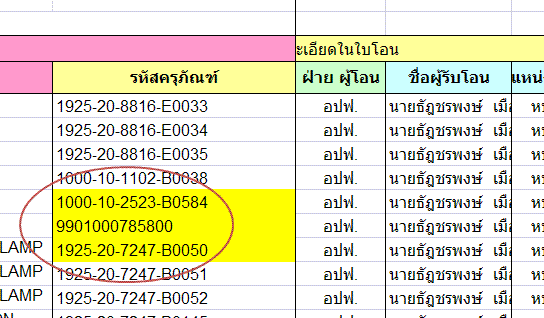
จากรูปข้อมูลในวงกลมมีทั้งข้อความ และ ตัวเลข
ถ้าผมใช้ โคด lMatch = Application.Match(CbB02.Text, rAll, 0) ก็จะเรียกได้ เฉพาะ ข้อความ
ถ้าผมใช้ โคด lMatch = Application.Match(CLng(CbB02.Text), rAll, 0) ก็จะเรียกได้ เฉพาะ ตัวเลข
ผมเลยนำโคดมาผสมกันแบบนี้ lMatch = Application.Match(CbB02.Text, rAll, 0) Or Application.Match(CLng(CbB02.Text), rAll, 0)
ที่นี้เรียกไม่ได้เลยครับ
อยากได้ โคดที่อ่านได้ทั้ง ข้อความ และ ตัวเลข ครับจะแขอย่างไรดี
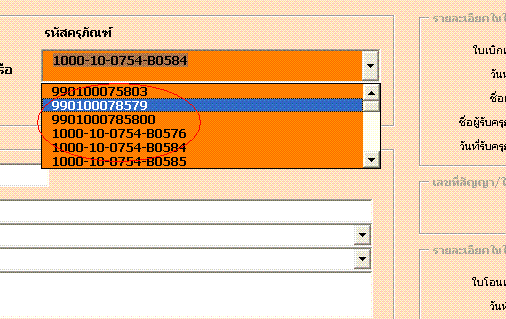
รูปแบบที่ใช้งานฟอร์มดังรูปล่างที่วงกลม จะเห็นว่ามีทั้งต้วเลขและตัวหนังสือผสมกัน อีกบรรทัด ก็จะเป็นเฉพาะตัวเลขอย่างเดียว
- untitled1234.GIF (12.21 KiB) Viewed 1639 times
ผมได้แนบไฟล์มาด้วย
Code: Select all
Private Sub CommandButton2_Click()
On Error Resume Next

    Dim rAll As Range
    Dim lMatch As Long
    Dim lCountif As Long

    imgBox.Picture = LoadPicture("")
    Sheets("HistoryDurable").Select
    Range("F7").Select

    With Sheets("HistoryDurable")
        Set rAll = .Range("F:F")
        lCountif = Application.CountIf(rAll, CbB02.Text)
        If lCountif > 0 Then
            lMatch = Application.Match(CbB02.Text, rAll, 0) Or Application.Match(CLng(CbB02.Text), rAll, 0)                          '   lMatch = Application.Match(CLng(CbB02.Text), rAll, 0)  ãªéä´é¡ÅѺµÑÇàÅ¢ÍÂèÒ§à´ÕÂÇ
            CbB01.Text = Clear
            TB1.Text = .Range("F" & lMatch).Offset(0, -4).Value
            TB2.Text = .Range("F" & lMatch).Offset(0, -3).Value
            CbB3.Text = .Range("F" & lMatch).Offset(0, -2).Value
            CbB4.Text = .Range("F" & lMatch).Offset(0, -1).Value
            TB5.Text = .Range("F" & lMatch).Offset(0, 0).Value
            TB16.Text = .Range("F" & lMatch).Offset(0, 1).Value
            TB6.Text = .Range("F" & lMatch).Offset(0, 2).Value
            CbB7.Text = .Range("F" & lMatch).Offset(0, 3).Value
            CbB8.Text = .Range("F" & lMatch).Offset(0, 4).Value
            TB9.Text = .Range("F" & lMatch).Offset(0, 5).Value
            TB10.Text = .Range("F" & lMatch).Offset(0, 6).Value
            TB11.Text = .Range("F" & lMatch).Offset(0, 7).Value
            CbB12.Text = .Range("F" & lMatch).Offset(0, 8).Value
            CbB13.Text = .Range("F" & lMatch).Offset(0, 9).Value
            TB14.Text = .Range("F" & lMatch).Offset(0, 37).Value
            TB15.Text = .Range("F" & lMatch).Offset(0, 38).Text
            TB21.Text = .Range("F" & lMatch).Offset(0, 10).Value
            TB22.Text = .Range("F" & lMatch).Offset(0, 11).Text                       ' à¡ÕÂǡѺáÊ´§¤èÒÇѹ·Õè text ,value
            CbB23.Text = .Range("F" & lMatch).Offset(0, 12).Value
            CbB24.Text = .Range("F" & lMatch).Offset(0, 13).Value
            TB25.Text = .Range("F" & lMatch).Offset(0, 14).Text
            TB31.Text = .Range("F" & lMatch).Offset(0, 15).Value
            TB41.Text = .Range("F" & lMatch).Offset(0, 16).Value
            TB42.Text = .Range("F" & lMatch).Offset(0, 17).Text
            CbB43.Text = .Range("F" & lMatch).Offset(0, 18).Value
            TB44.Text = .Range("F" & lMatch).Offset(0, 19).Value
            TB45.Text = .Range("F" & lMatch).Offset(0, 20).Value + " , " + .Range("F" & lMatch).Offset(0, 21).Value + " , " + .Range("F" & lMatch).Offset(0, 22).Value + " , " + .Range("F" & lMatch).Offset(0, 23).Value
            CbB46.Text = .Range("F" & lMatch).Offset(0, 24).Value
            TB47.Text = .Range("F" & lMatch).Offset(0, 25).Value
            TB48.Text = .Range("F" & lMatch).Offset(0, 26).Value + " , " + .Range("F" & lMatch).Offset(0, 27).Value + " , " + .Range("F" & lMatch).Offset(0, 28).Value + " , " + .Range("F" & lMatch).Offset(0, 29).Value
            CbB51.Text = .Range("F" & lMatch).Offset(0, 30).Value
            TB52.Text = .Range("F" & lMatch).Offset(0, 31).Value
            TB53.Text = .Range("F" & lMatch).Offset(0, 32).Value + " , " + .Range("F" & lMatch).Offset(0, 33).Value + " , " + .Range("F" & lMatch).Offset(0, 34).Value + " , " + .Range("F" & lMatch).Offset(0, 35).Value
            TB61.Text = .Range("F" & lMatch).Offset(0, 36).Value
            CbB17.Text = .Range("F" & lMatch).Offset(0, 39).Value
            TB18.Text = .Range("F" & lMatch).Offset(0, 40).Text
            CommandButton1.Enabled = False
        Else
             MsgBox " ¡ÃسҾÔÁ¾ìÅӴѺ·Õè¡è͹ ËÃ×Í ÅӴѺ·ÕèäÁèÁÕã¹°Ò¹¢éÍÁÙÅ", vbExclamation, "°Ò¹¢éÍÁÙźؤ¤Å"
             CbB02.Text = ""
        End If
    End With
End Sub

 snasui.com ยินดีต้อนรับ
  สมาชิกท่านใดที่ยังไม่ได้ระบุ Version ของ Excel ที่ใช้งานจริง สามารถทำตาม Link นี้เพื่อจะได้รับคำตอบที่ตรงกับ Version ของท่านครับ
 โปรดทราบ


