Page 1 of 1
VBA Delete row แบบมีเงื่อนไข
Posted: Tue May 02, 2017 1:50 pm
by kannaree
สวัสดีคะ ติดปัญหาเรื่องต้องการลบ Row มีมีเงื่อนไข
ถ้า Code = 407 และ 309 ให้ลบข้อมูลทั้งแถว
ติดปัญหาที่ว่า จากโค้ด ด้านล่าง
ต้องเอาเมาส์ ไปว่างที่ Cell A4(407) ข้อมูลถึงจะถูกลบ แต่เมื่อว่างที่เซลล์อื่น ไม่สามารถทำงานได้
และถ้าต้องการมี 2 Code ที่ต้องการลบ จะต้องเขียนโค้ดอย่างไรค่ะ
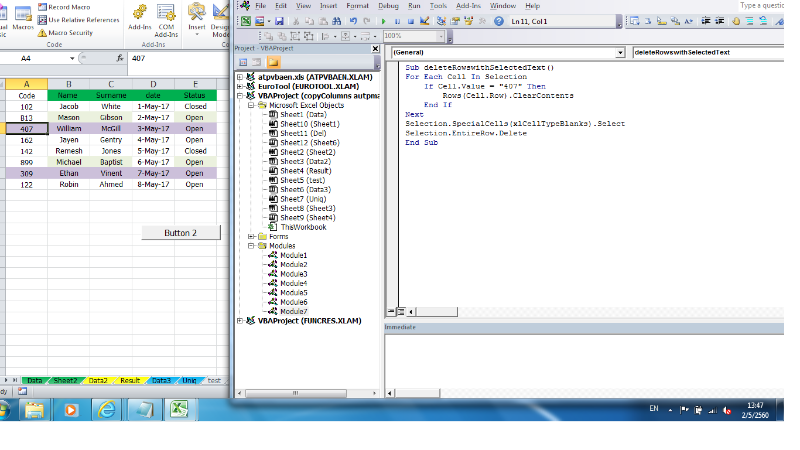
- 33333.png (146.04 KiB) Viewed 1529 times
Code: Select all
Sub deleteRowswithSelectedText()
For Each Cell In Selection
    If Cell.Value = "407" Then
        Rows(Cell.Row).ClearContents
    End If
Next
Selection.SpecialCells(xlCellTypeBlanks).Select
Selection.EntireRow.Delete
End Sub
Re: VBA Delete row แบบมีเงื่อนไข
Posted: Tue May 02, 2017 2:15 pm
by kannaree
มีการแก้ไขโค้ดเป็นแบบนี้แล้วค่ะ ไม่ต้องเอาเมาส์ไปอยู่ที่ Cell ที่ต้องการลบแล้ว แต่ถ้ามี number Code มากกว่า 1 ตัวจะต้องเขียนเงื่อนไขตรงไหนคะ
Code: Select all
Sub deleteRowswithSelectedText()
    Dim Firstrow As Long
    Dim Lastrow As Long
    Dim Lrow As Long
    Dim CalcMode As Long
    Dim ViewMode As Long

    With Application
        CalcMode = .Calculation
        .Calculation = xlCalculationManual
        .ScreenUpdating = False
    End With

    'We use the ActiveSheet but you can replace this with
    'Sheets("MySheet")if you want
    With ActiveSheet

        'We select the sheet so we can change the window view
        .Select

        'If you are in Page Break Preview Or Page Layout view go
        'back to normal view, we do this for speed
        ViewMode = ActiveWindow.View
        ActiveWindow.View = xlNormalView

        'Turn off Page Breaks, we do this for speed
        .DisplayPageBreaks = False

        'Set the first and last row to loop through
        Firstrow = .UsedRange.Cells(1).Row
        Lastrow = .UsedRange.Rows(.UsedRange.Rows.Count).Row

        'We loop from Lastrow to Firstrow (bottom to top)
        For Lrow = Lastrow To Firstrow Step -1

            'We check the values in the A column in this example
            With .Cells(Lrow, "A")

                If Not IsError(.Value) Then

                    If .Value = "162" Then .EntireRow.Delete
                    'This will delete each row with the Value "ron"
                    'in Column A, case sensitive.


                End If


            End With

        Next Lrow

    End With

    ActiveWindow.View = ViewMode
    With Application
        .ScreenUpdating = True
        .Calculation = CalcMode
    End With

End Sub
ลองใช้ Else if แล้วติด Error
Re: VBA Delete row แบบมีเงื่อนไข
Posted: Tue May 02, 2017 2:17 pm
by kannaree
ขอโทษค่ะ ลืมลบ Comment
Code: Select all
Sub deleteRowswithSelectedText()
    Dim Firstrow As Long
    Dim Lastrow As Long
    Dim Lrow As Long
    Dim CalcMode As Long
    Dim ViewMode As Long

    With Application
        CalcMode = .Calculation
        .Calculation = xlCalculationManual
        .ScreenUpdating = False
    End With


    With ActiveSheet


        .Select


        ViewMode = ActiveWindow.View
        ActiveWindow.View = xlNormalView


        .DisplayPageBreaks = False


        Firstrow = .UsedRange.Cells(1).Row
        Lastrow = .UsedRange.Rows(.UsedRange.Rows.Count).Row

        For Lrow = Lastrow To Firstrow Step -1


            With .Cells(Lrow, "A")

                If Not IsError(.Value) Then

                    If .Value = "162" Then .EntireRow.Delete


                End If


            End With

        Next Lrow

    End With

    ActiveWindow.View = ViewMode
    With Application
        .ScreenUpdating = True
        .Calculation = CalcMode
    End With

End Sub
Re: VBA Delete row แบบมีเงื่อนไข
Posted: Tue May 02, 2017 4:08 pm
by kannaree
ทำได้แล้วค่ะ โดยเอา Or เข้ามาช่วย
Code: Select all
If .Value = "407" Or .Value = "309" Then .EntireRow.Delete
ขอบคุณมากค่ะ
ถามอีกคำถามนึงนะคะ ถ้าจะทำปุ่มกดฟังก์ชั่นนี้ให้ไปอยู่ใน ใน Sheet2 แต่ ลบแถว Sheet1 จะต้องเพิ่มโค้ดตรงส่วนไหนคะ
Re: VBA Delete row แบบมีเงื่อนไข
Posted: Wed May 03, 2017 1:55 pm
by niwat2811
ลองปรับเป็นแบบนี้ดูครับ
Code: Select all
Sub test()
Dim lr As Long, i As Integer
Application.ScreenUpdating = False
With Sheets("Sheet1")
    lr = .Range("A" & Rows.Count).End(xlUp).Row
    For i = lr To 2 Step -1
        If .Range("A" & i).Value = "309" Or .Range("A" & i).Value = "407" Then
            .Range("A" & i).EntireRow.Delete
        End If
    Next i
End With
Application.ScreenUpdating = True
End Sub
Re: VBA Delete row แบบมีเงื่อนไข
Posted: Thu May 04, 2017 9:17 am
by kannaree
ขอบคุณ K.niwat2811 มาก ๆ ค่ะ
เมื่อได้ลอง Code ของ K.niwat2811 แล้วเกิดปัญหาที่ว่า ข้อมูลจริงมี 70,000 records เกิด error ในบรรทัดที่ไฮไลท์ ไม่ทราบว่าจะ
ต้องแก้ไขอย่างไรคะ ขอบคุณค่ะ
Code: Select all
 Sub test()
Dim lr As Long, i As Integer
Application.ScreenUpdating = False
With Sheets("Sheet1")
    lr = .Range("A" & Rows.Count).End(xlUp).Row
    [color=#FF0000]For i = lr To 2 Step -1[/color]
        If .Range("A" & i).Value = "309" Or .Range("A" & i).Value = "407" Then
            .Range("A" & i).EntireRow.Delete
        End If
    Next i
End With
Application.ScreenUpdating = True
End Sub
Re: VBA Delete row แบบมีเงื่อนไข
Posted: Thu May 04, 2017 9:20 am
by kannaree
ขอแก้ไขข้อความค่ะ ไม่ทราบว่าเปลี่ยนสีไม่ได้
Error ที่บรรทัดนี้ค่ะ
เมื่อมีข้อมูลมาก ประมาณ 70,000 records
Re: VBA Delete row แบบมีเงื่อนไข
Posted: Thu May 04, 2017 10:11 pm
by snasui

แก้ไขการประกาศตัวแปร i เสียใหม่ให้เป็น Long แทนของเดิมที่เป็น Integer ครับ
Re: VBA Delete row แบบมีเงื่อนไข
Posted: Fri May 05, 2017 8:36 am
by kannaree
ขอบคุณอาจารย์มากค่ะ ความรู้พื้นฐานยังไม่แน่นต้องไปศึกษาเพิ่มเติมตอนนี้อาศัยหาตัวอย่างโค้ดแล้วไปประยุกต์ใช้กับงานตัวเอง ขอบคุณทุกคนมากๆ นะคะ
ขอถามอีกคำถามนึงได้ไหมค่ะ เงื่อนไขที่เป็น 14xxxxxxx 17xxxxx เราสามารถเขียนเงื่อนไข เป็น 14* หนูลองดูแล้วไม่ได้ จะต้องเปลี่ยนเงื่อนไขอย่างไรค่ะ
Code: Select all
If .Range("A" & i).Value = "14*" Or .Range("A" & i).Value = "17*" Then
Re: VBA Delete row แบบมีเงื่อนไข
Posted: Fri May 05, 2017 4:39 pm
by niwat2811
ลองปรับ Code เป็นแบบนี้ดูครับ
Code: Select all
Sub test1()
Dim lr As Long, i As Long
Application.ScreenUpdating = False
With Sheets("Sheet1")
    lr = .Range("A" & Rows.Count).End(xlUp).Row
    For i = lr To 2 Step -1
        If Left(.Range("A" & i).Value, 2) = "14" Or Left(.Range("A" & i).Value, 2) = "17" Then
            .Range("A" & i).EntireRow.Delete
        End If
    Next i
End With
Application.ScreenUpdating = True
End Sub
Re: VBA Delete row แบบมีเงื่อนไข
Posted: Mon May 08, 2017 3:10 pm
by kannaree
ได้แล้วค่ะ ขอบคุณ K.niwat มากค่ะ